Gyh's Braindump
Java Grammar
- tags
- Java
- source
- DT-On Java 8
1 Objects
1.1 Identifiers in Java are all references
object references stored in stack, objects stored in heap
1.2 Not all identifiers have objects connected
String s;  // no objects connected
String s = "asdf";  // an object connected
1.3 Create objects using new
String s = new String("asdf");
2 Primitive Types
- variable holds the value directly, placed on the stack
- sizes of primitive types don’t change on different machine architectures
- Java has no
sizeoffunction, whose main goal is for portability (C, C++)
- Java has no
- all numeric types are signed
- size of boolean is defined to take the literal values true or false
- Autoboxing automatically converts a primitive to a wrapped object and back
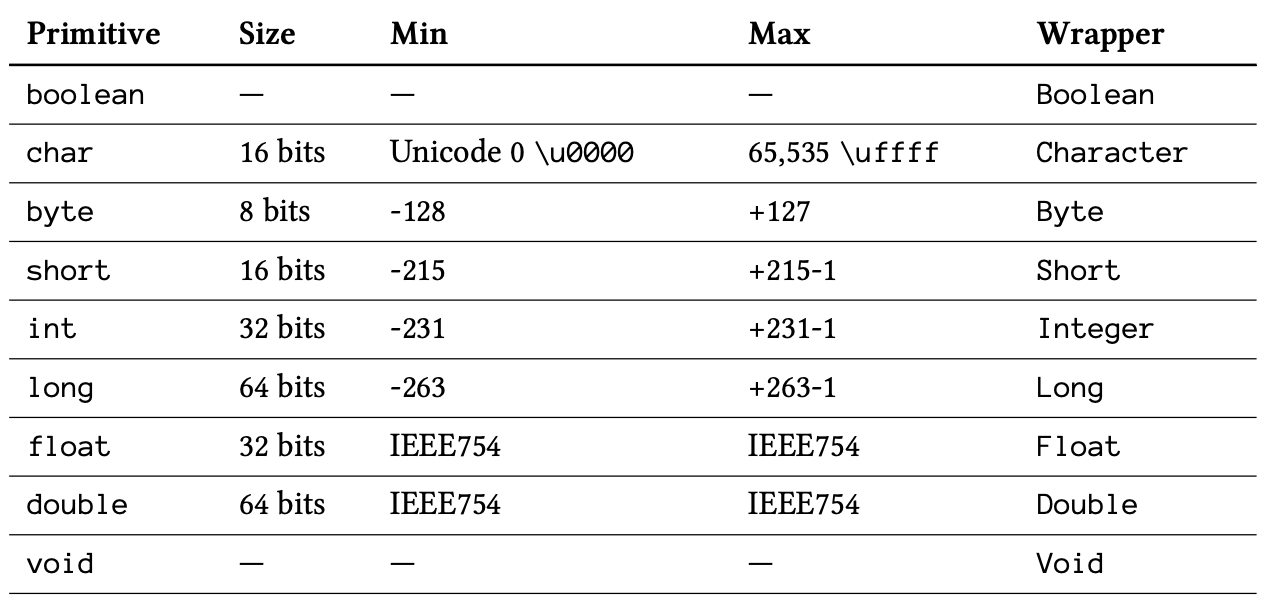
3 Scoping of variables
a variable defined inside a scope is no longer accessiable outside of the scope
hide a variable in a larger scope is not allowed in Java
  {
      int x = 12;
      {
          int x = 96;  // illegal
      }
  }
primitive types are released outside of the scope beacuse they are stored on the stack
objects persist past the end of the scope, references are released
4 Namespaces
Java use reversed URLs. Every file automatically live in their own namespaces. Each class within a file has a unique identifier.
Problem: deep directory path, many of them are empty (e.g. com)
5 Code Structure
- each file is a compilation unit which can have only one public class
- a working program is a bunch of .class files, which can be packaged and compressed into a Java ARchive (JAR) file and java interpreter is responsible for finding, loading and interpreting these files
- CLASSPATH is where the interpreter goes to find all class files
- suppose one class file is under namespace “com.gyh.package.simple”
- its file path is “
/com/gyh/package/simple”
- JAR file needs to put their absolute file location, not the directory path, into CLASSPATH
6 static keyword
6.1 Purposes
- want a single, shared piece of storage for a particular field
- want a method that isn’t associated with any paticular object of this class
7 final keyword
| position | ease | box | interval | due |
|---|---|---|---|---|
| front | 2.50 | 3 | 6.00 | 2021-01-28T20:29:02Z |
7.1 constant in two ways
- compile time constant that won’t ever change
final int valueOne = 9 - a value initialized at run time that you don’t want to change
static final int INT_5 = rand.nextInt(20)
7.2 final data
- with a primitive,
finalmakes the value a constant - with an object reference,
finalmakes the reference pointed to constant- class instances, array, etc.
finalhas nothing to do with Inheritance, it only indicates that outside of the constructor, the field cannot be changed
class A {
	final int i;
	protected A(int ii) {
		i = ii;
	}
}

class B extends A {
	public B() { super(1000); }
	public void print() {System.out.println(i);}
	public static void main(String[] args) {
		new B().print();
	}
}
/* Output
1000
*/
7.3 Blank final
Blank finals are finals fields without initialization values. Variables with blank finals can be initialized later, so it’s possible to have different final values for same field in different instances.
class BlankFinal {
    private final int i;
    public BlankFinal() { i = 1; }
}
7.4 final arguments
finalarguments cannot be changed inside the method- primarily used to pass data to anonymous Java Inner Class
7.5 final methods
- prevent Derived Classs override methods
Private methods in a class are implicitly final
Define methods using the same name with private methods in base class is not Overriding
    public class PrivateOverride {
        private void f() {
            System.out.println("private f()");
        }

        public static void main(String[] args) {
            PrivateOverride po = new Derived(); po.f();
        }
    }

    class Derived extends PrivateOverride {
        public void f() { System.out.println("public f()"); }
    }

    /* Output:
       private f()
       */
- deprecated: let compilers make this method inline for efficiency (in earlier Java), however, today encourages let compilers and JVM handle efficiency issues
7.6 final class
Prevent all inheritance from this class
8 Casting
- widening conversion: explicitly or implicitly
- wider types truncated into narrower types
- narrowing conversion: explicitly
- any primitive type can be casted into any other primitive type
- Class type do not allow casting
8.1 Promotion
| position | ease | box | interval | due |
|---|---|---|---|---|
| front | 2.50 | 3 | 6.00 | 2021-01-23T18:22:21Z |
Any mathematical or bitwise operations on primitive data types smaller than int (char, byte, short), those values are promoted to int before performing the operations, and the resulting values are int, so when assigning back, there might be some losing information.
If arithmetic operators not combined with equal operator, the result (right side) must be explicitly cast back to the original type:
short x = 1, y = 2;
s = (short) x * y;
s = (short) ~y;
9 Operators
9.1 Shift Operators
<<, inserting zero at the lower-order bits>>, value positive: inserting zero at the higher-order bits, value negative: inserting one>>>, unsigned right shift, inserting zeros- when shifting a char, byte or short, it is promoted to int before shifting, and result is int
maximum effective shifting number
| position | ease | box | interval | due |
|---|---|---|---|---|
| front | 2.50 | 3 | 6.00 | 2021-01-23T18:17:48Z |
if left operand is int, only FIVE lower-order bits of the right-hand side are used to prevent shifting more than the number of bits in an int
e.g.,
5>>32 -> 0if left operand is long, only SIX lower-order bits of the right-hand side are used
special case when combining shift operators with equal sign
| position | ease | box | interval | due |
|---|---|---|---|---|
| front | 2.50 | 3 | 6.00 | 2021-01-23T18:21:03Z |
If left operand is byte or short, they promoted to int,
then truncated when assigned back, so sometimes get -1.
short s = -1;  // 1111-1111-1111-1111
System.out.println(Integer.toBinaryString(s));
s >>>= 10;
// s >>> 10:
//  promoted to int first: 1111-1111-1111-1111-1111-1111-1111-1111
//  right shift 10: 0000-0000-0011-1111-1111-1111-1111-1111
// assign back, truncated: 1111-1111-1111-1111, s remains same
System.out.println(Integer.toBinaryString(s));
s = -1;
s >>>= 17;
System.out.println(Integer.toBinaryString(s));
/*out
11111111111111111111111111111111
11111111111111111111111111111111
111111111111111
*/
byte b = -1;
System.out.println(Integer.toBinaryString(b));
b >>>= 10;
System.out.println(Integer.toBinaryString(b));
System.out.println(Integer.toBinaryString(b>>>10));
/* out
11111111111111111111111111111111
11111111111111111111111111111111
1111111111111111111111
*/
10 Arrays
- a Java array is guarenteed to be initialized and cannot be accessed outside of its range
- when creating an array of objects, an array of references (value is
null) are actually created
11 Java Access Control
12 Variable Argument Lists
| position | ease | box | interval | due |
|---|---|---|---|---|
| front | 2.50 | 3 | 6.00 | 2021-01-26T23:02:44Z |
12.1 Array of Objects
public class VarArgs {
    static void printArray(Object[] args) {
        for (Object obj: args)
            System.out.print(obj + " ");
    }
    public static void main(String[] args) {
        printArray(new Object[]{
                47, (float) 3.14, 11.11, "string"});
    }
}
12.2 Ellipses
- convert list of elements to an array
- can take an array as an argument
- can take empty arguments -> use as optional trailing arguments
void printArray(Object... args) {
    for (Object obj: args)
        System.out.print(obj + " ");
}

void printArrayOptional(String arg1, Object... args) {

}

void main() {
    printArray(47, (float) 3.15, 11.11, "one");
    printArray((Object[])new Integer[]{1, 2, 3, 4});
    printArray();
    printArrayOptional("111", 1, "3", 4.32);
    printArrayOptional("111");
}
12.3 Variable argument list in overloaded methods may cause more than one match when calling
void f(float i, char... args);
void f(char... args);

// call with
f('a', 'b');  // won't compile
13 Enumerated Types
| position | ease | box | interval | due |
|---|---|---|---|---|
| front | 2.50 | 3 | 6.00 | 2021-01-26T23:30:20Z |
- instances of enumerated types are constants
public enum Spiciness {
    NOT, MILE, MEDIUM, HOT, FLAMING
}

public class SimpleEnumUse {
    public static void main(String[] args) {
        Spiciness howHot = Spiciness.MEDIUM;
        System.out.println(howHot);
        for(Spiciness s : Spiciness.values())
            System.out.println(
                s + ", ordinal " + s.ordinal());
    }
}
/* output:
MEDIUM
NOT, ordinal 0
MILD, ordinal 1
MEDIUM, ordinal 2
HOT, ordinal 3
FLAMING, ordinal 4
*/
- can be used in
switch
switch (degree) {
    case NOT:
    case MILE:
    default: break
}
14 Other
%nhandles different line endings on different platforms when usingSystem.out.printforSystem.out.formateorEmeans “ten to the power”, e.g., 1.38e-43f means 1.38 * 10-43gotois a reversed word in Java, but it’s not used- similar grammars are
break labelandcontinue label - only consider using labels is when you have nested loops and must break or continue more than one nested level
- similar grammars are